Home / Projects / Make your site agent-ready: robots.txt for AI
Make your site agent-ready: robots.txt for AI
Published Oct 30, 2026
Score your site on Cloudflare's free agent-readiness scanner, then add one line to robots.txt that tells AI companies what they may do with your pages.
What it is: a 10-minute check and fix for your website. You score the site on isitagentready.com, a free scanner made by Cloudflare (a company many websites run behind to load faster and block attacks). Then you add one line to your robots.txt file that tells AI companies what they may do with your pages: show them in search, quote them in AI answers, and train their models on them. You can say yes or no to each.
A few words you'll see on this page:
- robots.txt is a small text file at the root of your site, like
example.com/robots.txt. Programs that visit your site read it first to see which pages they're allowed to fetch. - A crawler is one of those programs. It downloads web pages one after another. Googlebot (Google's) and GPTBot (OpenAI's) are crawlers.
- A user agent is the name a crawler gives itself when it visits. robots.txt uses it to aim rules at one crawler, or at all of them with
*. - An AI agent is software that reads or acts on web pages for a person, such as ChatGPT opening your page to answer someone's question.
Why it exists
robots.txt has always said whether a crawler may fetch a page. It has never said what the crawler may do with the page afterwards. A search engine and a company training an AI model can fetch the same page for very different reasons.
Content Signals (contentsignals.org) add one line for that. Cloudflare's scanner looks for it, and for most sites that already have a robots.txt and a sitemap (a list of your pages for search engines), that line is the only thing between the scanner's Level 1 and Level 2.
Step 1: Scan your site
Go to isitagentready.com, type your site's address, and choose Content Site. That option runs only the checks a normal website needs. The others are for sites that offer tools or a store to AI agents.
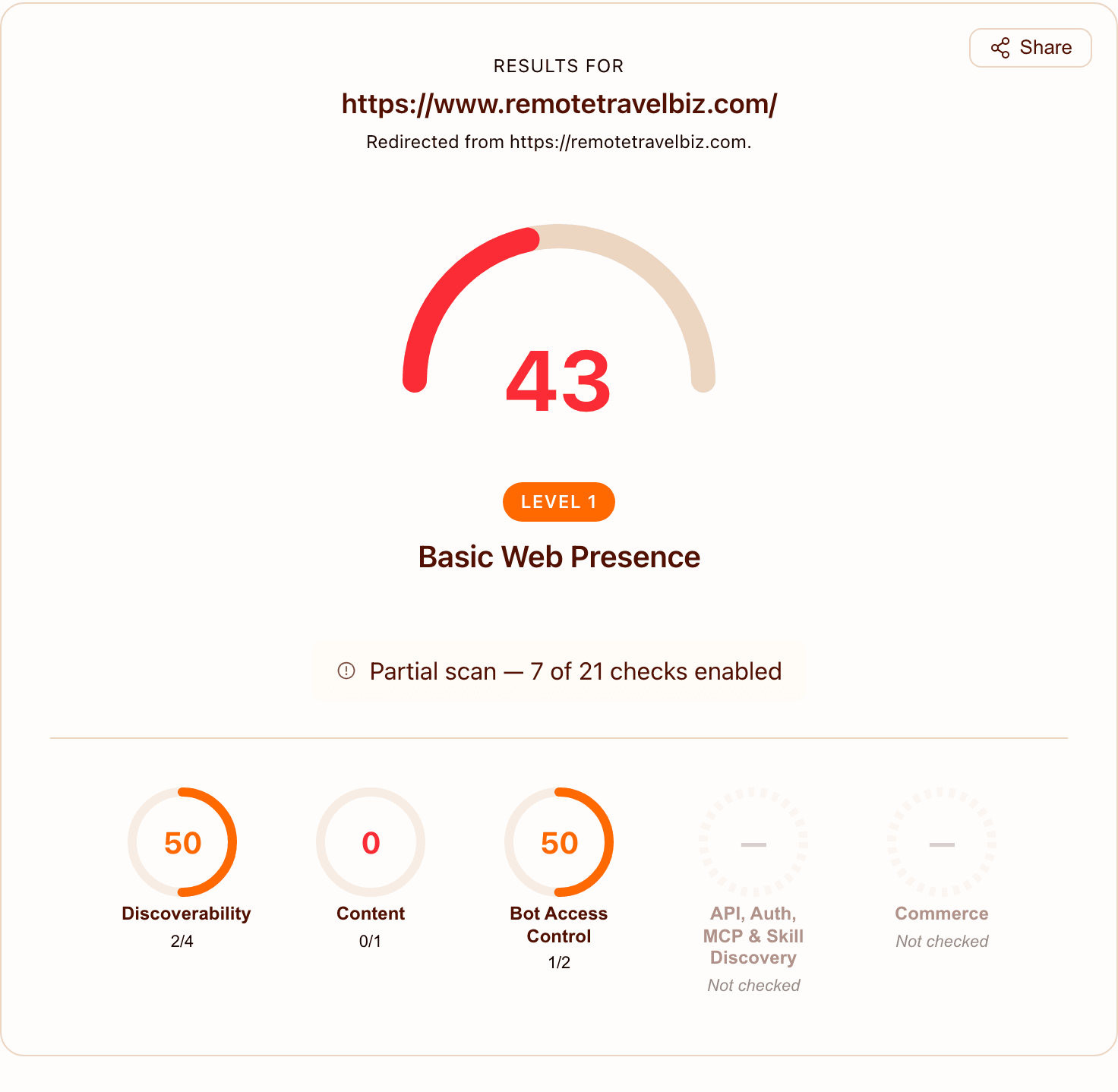
The two levels that matter here:
- Level 1, "Basic Web Presence": your site has a robots.txt and a sitemap. Most sites start here.
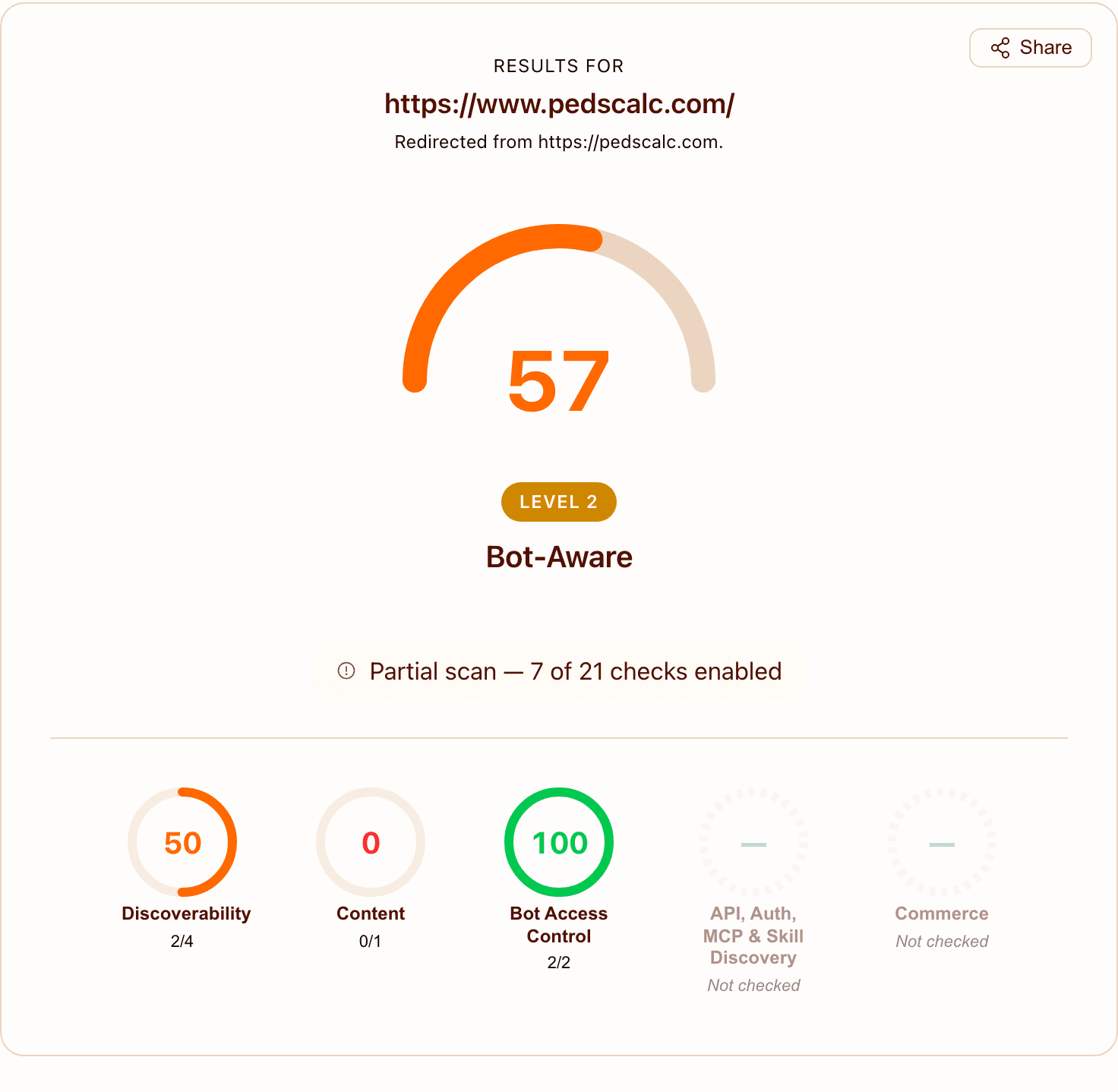
- Level 2, "Bot-Aware": your robots.txt also states what AI may do with your content. This is the level we're aiming for.
If the scan says Level 2 already, you're done, unless you want to change your answers below.
Step 2: Decide what AI may do
The line has three answers in it, each yes or no:
| Signal | What yes allows | What no says |
|---|---|---|
search | Adding your pages to a search engine's index (its catalog of pages it can show) and listing them in results with a link and a short excerpt | Don't index me for search |
ai-input | AI tools like ChatGPT, Claude or Perplexity reading your page to answer a question right now, usually with a link back to you | Don't use me in AI answers |
ai-train | AI companies using your pages to train future models | Don't train on me |
search doesn't cover AI-written summaries at the top of search results. Those count as ai-input.
If you leave one out, you haven't stated a choice for it. Leaving it out doesn't mean no.
The signals are preferences. Not every AI company reads them, and Google hasn't said that it does.
We chose search=yes, ai-input=yes, ai-train=yes. We make free tools and want them known: in search, quoted in AI answers, and in what future models know offline. Someone who sells original writing may reasonably pick ai-train=no, so their work doesn't train a model they get nothing back from.
If your site runs ads: AI answers don't show your ads. That's a reason to think about ai-input. We still said yes, because a quote in an AI answer usually comes with a link, and the people who click it see your ads like any other visitor.
To stop one AI crawler: Content Signals don't lock anything. A crawler that ignores them can still use your pages. To stop a crawler from fetching your site at all, give it its own group with Disallow: /. This example stops GPTBot, OpenAI's crawler for training its models:
User-agent: GPTBot
Content-Signal: search=yes, ai-input=yes, ai-train=no
Disallow: /
Crawlers that follow robots.txt will obey it. It only stops the crawler you name: OpenAI's other crawlers and other companies' crawlers still visit. This doesn't affect Google Search (Googlebot). For Google, the separate name Google-Extended covers its other AI systems, such as Gemini. Its AI features in Search follow the usual search controls instead, like nosnippet and noindex, which Google's guide to AI features explains.
Step 3: Add the line to robots.txt
The line goes into every group in the file. A group starts with one or more User-agent: lines. A crawler only reads the group that matches its name, so a line in one group doesn't reach the others.
Here's a common robots.txt before:
User-agent: *
Allow: /

User-agent: GPTBot
Allow: /

Sitemap: https://www.example.com/sitemap.xml
Don't add new User-agent groups while you're here, unless it's the block from step 2 on purpose: a crawler that has its own group ignores every rule in the * group. (Allow: / means the crawler may fetch every page.)
And after, with our choice:
User-agent: *
Content-Signal: search=yes, ai-input=yes, ai-train=yes
Allow: /

User-agent: GPTBot
Content-Signal: search=yes, ai-input=yes, ai-train=yes
Allow: /

Sitemap: https://www.example.com/sitemap.xml
The line to paste (change the answers to yours):
Content-Signal: search=yes, ai-input=yes, ai-train=yes
Where to make the change depends on how your site is built:
- A plain
robots.txtfile in your site's files: edit it and add the line right after each group'sUser-agent:lines. - Next.js (a popular tool for building websites with code): if the site makes robots.txt from an
app/robots.tsfile, Next.js 16.3 or later can add the line with itsothersetting. Older versions can't, so you replace that file with one that writes the text by hand. The fixes guide has both versions to copy. - WordPress: use the robots.txt editor in your SEO plugin (an add-on you install inside WordPress). In Yoast SEO it's Yoast SEO > Tools > File editor. In Rank Math it's Rank Math SEO > General Settings > Edit robots.txt (turn on Advanced Mode first). If Rank Math's editor seems to do nothing, a real
robots.txtfile on your host is overriding it; the fixes guide explains how to check. - Shopify: you edit the theme's
robots.txt.liquidtemplate, and the fixes guide has the code. We haven't tried it on a real store. One misplaced-in the template can join the line onto the nextUser-agentline and break that group, so make the change in an unpublished copy of your theme first and check the output before you publish. - Wix: in your dashboard, open the SEO section, then Tools and settings > Robots.txt Editor > View File. Add the line under each
User-agent:line and save. - Webflow: Site settings > SEO > Indexing has a robots.txt box. Add the line under each
User-agent:line, save, then publish. - We haven't confirmed that Wix and Webflow keep a line they don't recognize, so check the live file after saving.
- Squarespace: we couldn't find a way to edit robots.txt. If you can't either, you can stop here: the scanner will keep saying Level 1, and that doesn't hurt your search traffic.
Change nothing else in the file. In particular, don't add new Disallow lines unless you mean to block something.
Step 4: Publish and scan again
Publish the change the way you normally update your site. Then open your robots.txt in the browser (your address plus /robots.txt) and check that every group has the line.
On a Mac you can also check from Terminal, the app where you type commands. curl is a built-in program that fetches a web address and prints what comes back:
curl -s https://www.example.com/robots.txt
Then run the scan on isitagentready.com again.
What about llms.txt?
llms.txt is a proposed file that lists a site's important pages in plain text for AI tools. It gets far more searches than robots.txt for AI (about 5,400 a month in the US against about 50, from the keyword-data service DataForSEO in October 2026), so here's where it fits: Google says you don't need any new AI text files to appear in AI Overviews, the AI summaries at the top of its search results, and the scanner's Level 2 doesn't check for llms.txt. It's optional. This site has one because it took a few minutes, but it isn't what moves your score.
What we skipped and why
The scanner checks more than this. We left these alone on purpose:
- Markdown versions of each page for agents. Markdown is plain text with a few symbols for headings and links. This check wants your site to serve agents a Markdown copy of every page. On a site with ads, that hands over the content without the ads.
- DNS records for AI discovery. DNS is the address book that points your domain at your host. A record for AI tools exists on paper, but nobody uses it yet.
- API and MCP checks. An API is a way for programs to talk to your site directly, and MCP is a standard for giving AI tools access to one. These only matter if your site offers tools to AI agents. Publishing empty ones would say something untrue about your site.
What we want is to be found in search and quoted in AI answers, and a higher score doesn't bring either on its own. We added Content Signals because the line takes minutes, doesn't change how search engines crawl you, and states something true about the site.
How we did it
On 2026-10-29 we scanned six of our own sites: pedscalc.com, swiftschema.com, allthecalculations.com, flextimer.app, elevationbaking.com and williamsburgmedspa.com. All six were Level 1, and all six needed only the Content Signals line. All six reached Level 2 the same day, using Claude Code with the free skill below.
The scan turned up one more thing. One site answered made-up addresses with a normal page instead of a "not found" error. That's called a soft 404, and it confuses search engines because a missing page looks like a real one. We fixed it for top-level addresses; a deeper case is still on our list.
Do it with Claude Code
This route is for sites whose files are on your computer, like a site built with Next.js or plain HTML files. On WordPress, Shopify, Wix, Webflow or Squarespace, use steps 1 to 4 above.
We packed the steps above into a free skill: a set of written instructions that Claude Code follows. It scans the site, explains the three answers and asks you to pick, finds where your robots.txt comes from, adds the line to every group, and checks the live file after you publish. It never picks your answers for you and never blocks a crawler.
The code is at github.com/buildleansaas/agent-ready. To install it, open Terminal and paste this. It downloads a copy of the skill into the folder where Claude Code looks for skills, ~/.claude/skills (the ~ means your home folder). git is the tool that does the downloading; the Mac setup installs it:
git clone https://github.com/buildleansaas/agent-ready ~/.claude/skills/agent-ready
To use it in one project only, put it in .claude/skills/agent-ready inside that project's folder instead. Then open Claude Code in your site's project folder and ask:
Is my site agent ready?
New to this? Start with what vibe coding is and install Claude Code. It's also on our skills page, next to other free skills worth installing.
ScaleSleek is coming soon to check and fix this on every site, every week. Join the waitlist.
Buy me a beer
The skill is free and will stay free. If it saved you some hassle, you can buy me a beer 🍺. You pick the amount.
Checklist
Saved in this browser. No account. Clearing site data wipes it.
Next: Install Claude Code
Get new guides and videos by email
One email when something new is up. No spam. Unsubscribe anytime.